Pages

Sunday, July 15, 2012

Android Tablets: How To Choose The Best Android Tablet


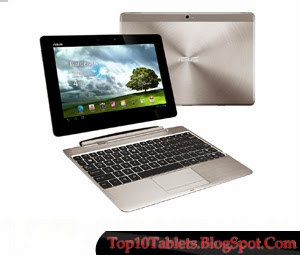
Android tablets are sleek, cool and very hot property right now! In just a couple of years they went from nowhere to a big challenger to PC and laptop sales, mainly thanks to Apple's revolutionary iPad.

What Apple did was saw a gap in the market based upon peoples' computer usage. They saw a trend heading towards computers that were aimed simply at content consumption, content being music, video, internet, games and news. Bearing in mind these needs, tablets were born!

A tablet PC is a flat screen PC that looks similar to a laptop's screen. You'll notice that there is no keyboard! In fact, tablets are PCs but without many of the components that make up a traditional computer such as keyboard, heavy battery, fans and mouse or touchpad. In order to check media, internet and the news tablets just need a touchscreen, this makes them cheaper and more lightweight than a big laptop.

But with so many tablets on the market how do you choose the best android tablet? There are a few important points to consider, namely your needs, the screen size and type and cost of the device:

Your needs: If you are a heavy internet browser and are getting fed up with your power-hungry laptop always running out of batteries while you're in the middle of reading a cool blog, then a tablet is for you. If you love watching movies and listening to music while you're out, but don't need to do other work, then a tablet is for you. If you want constant access to your emails and the world online then a tablet is for you. However, if you're planning on doing a lot of work and having loads of documents, spreadsheets and web browser windows at the same time, then the superior horsepower afforded by a laptop would probably be beneficial.

Screen size: There are several different screen sizes available for tablets, ranging from a pocket-sized 5 inches up to a larger 10 inches. The smaller the tablet, the more portable it becomes, but with every inch you drop you are sacrificing potential viewing pleasure as it will become harder to see pages and films. If you're a heavy video consumer then you might want to invest in the largest possible size of touchscreen tablet which is currently around 10 inches.

Tablet type: Most of the big name brands have now released tablets and they are all of the highest possible specification, but that comes at a high cost too. Did you know that if you're prepared to lose the name tag you could save a lot of money by getting a non-name tablet which could be hundreds of dollars cheaper?

Tablet cost: Non-name tablets start from less than 200 dollars which is ridiculously low for new technology, but you can pay more than 600 dollars for the biggest names like Apple. Either way, you'll find that tablets are cheaper than other PCs since you're not paying for extra hardware such as a keyboard and motherboard with fans.

High price tablets are easy to find in any large household name store, but if you are a canny shopper you'll check online where you can find the cheaper non-name versions. Just search online for an Android tablet - it's that simple to save a load of cash!


This post was made using the Auto Blogging Software from WebMagnates.org This line will not appear when posts are made after activating the software to full version.

Saturday, July 14, 2012

Motorola Android Tablet PC Review

Best Android Tablet Features You Need to Look For


In early 2010, after Apple's iPad shown successful debut and signaled the beginning of new tablet PC market, many computer hardware manufacturers noticed and acknowledged the possible large market for tablet PC and prepared during the year. Tablet PC, in design, should be light, portable, and inexpensive while the computing power should be fast enough for daily tasks such as web browsing, email, Twitter, and Facebook.

These tasks are simple enough so they did not want to deploy using Windows OS which requires higher computing power to run smoothly and it is not cheap either. That is why Google Android OS became the popular OS for the new tablet PC among the manufacturers. Android OS is open sourced, and publicly maintained and largely adopted by the smart phones. The latest publicly release version is v2.3 code name Gingerbread. But most of the latest devices come with version 2.2. Google recently announced v3.0 Honeycomb, but it is officially announced that this is for the tablet PC only at this time. Many consumers want to try out the latest version and that's why many manufacturers are planning to adopt Android 3.0 as soon as possible.

Now then what are the important features of Android tablet PC you want to look for when buying a tablet PC? I have listed the important features below starting from the most important to least.

*Processor: The heart of the any computing device. Lower end tablets install 600 MHz processor, but it is important to select a device with at least 1 GHz processor or you will experience noticeable delay. CortexA8 1GHz and NVIDIA's Tegra 1GHz are the popular 1GHz processors.

* Display size and resolution: Popular display sizes are 7 inch and 10 inch. It is mainly depend on your requirement. If you would like to use the table as quick web surfing device only at home and would like a large screen, you would definitely prefer 10 inch tablet. But if you want to bring your tablet around everywhere and enjoy, then you would definitely want to get 7 inch tablet.

* Operating System: Android 2.2 is the latest popular version and you want to look for it. It is known to be faster than previous versions and any other lower versions are not recommended. Also many people anticipate the latest version 3.0 codenamed Honeycomb, but there is no device available yet. It is known to be more adapted to the tablet PC. You know, Android was originally developed to be used with smaller sized smart phones. If you prefer Windows OS based tablet PC, you should be prepare to spend few hundred dollars more because Windows OS requires higher computing power and the expensive OS license fee too.

* RAM, Storage, and SD slot: RAM memory size should around 512MB is good, but higher end devices come with 1GB memory. Default storage varies from 2GB to 32 GB or more. But usually they come with external SD card slots that supports up to 32GB So you want to make sure they have SD card slot.

* Internet 3G and Wi-Fi: This requirement is also depend on how you want to use your tablet. If you want to keep your tablet PC with you all the time, you would probably want to buy 3G supported version. But you need to spend few hundred dollars more in the 3G supported version. Some of tablet PC planned to be announced later in 2011 will have the blazing 4G such as Motorola Xoom. You can still bring around your Wi-Fi only version tablet PC and enjoy the Internet at various places since many public libraries, book stores, coffee shops, and airports provides free public Wi-Fi hotspot services.

* Camera and Video recording: Does it have Camera? In rear or front or both? What is the pixel size? At least front camera is necessary, so you can video chat. Also you want to check if it supports 720 HD or Full HD video recording.

* Touch Screen: Capacitive or Resistive? Capacitive is better over resistive screen, but some prefers resistive. Capacitive screen detects the touch when touched with a electrical conductor such as human body. Resistive screen detects the touch when pressure on the screen is detected. It is more often better to work with fingernails or sharper object such as stylus than finger. Also make sure that it supports multi touch which is required for multi finger zoom in and out.

* Battery power: How long does the battery last? iPad is known to last 10 hours of web surfing, watching movie, and listening music. In fact, if you can get from Android device with 10 hours support, it has very good battery.

* Other connectivity and ports: USB, Bluetooth, 4G, HDMI output,

* Other features: Accelerometer, GPS, Gyroscope.

The more important features should be Processor, Display Size and Storage size. Many other features are often provided as default features for the latest popular Android tablet PCs. But do not assume that the new fancy android tablet PC will have all the popular features. It is important that you visit their website or popular gadget review site and confirm the existence of desired feature from the detailed specifications before actually purchasing the product.

In terms of price, you usually have to pay around $500 ~ $700 for Wi-Fi version and $600 ~ $1000 for 3G version for higher ends tablet PC, but if you are willing to sacrifice some of the features, you can get a nice decent tablet PC around $300 too. I will talk about this later in a different article.

I hope that this introduction to the features of Android tablet PC helps you shopping for the best android tablet.


This post was made using the Auto Blogging Software from WebMagnates.org This line will not appear when posts are made after activating the software to full version.

Tablet Splitting: Inconsistent and Potentially Dangerous


Healthcare providers and patients frequently split tablets for a number of reasons. Chiefly, tablet splitting is used to (a) make the tablets easier to swallow, (b) adjust the dosage or c) reduce the cost (for example, a 90-day supply is split will last six months). But a new study reports that tablet splitting is potentially dangerous because it produces a wide variability in the dosage the patient actually receives.

Pharmaceutical scientist Charlotte Verrue and colleagues of Ghent University in Berlin to measure how much the tablet weight differs from its expected weight when split by different individuals and how much of the tablet is lost when the tablet is split into unusable fragments. Five volunteers were given eight commercially available tablets of different sizes and shapes that are routinely found in nursing homes.

They drugs included Marevan (warfarin), Lanoxin (digoxin), and Sinemet (Levodopa and carbidopa) and Metformin (metformin). Of the different tablet types, three had one score down the middle, two had two scores like a cross, and three were unscored. Volunteers were asked to split the tablets using different routinely used methods: a commercial tablet cutter, by hand for prescored tablets, by scissors for unscored tablets, or by kitchen knife. Before and after splitting each tablet and its subsequent fragments were weighed.

Verrue found that nearly a third of all tablets sliced by any method investigated varied by more than 15% from the prescribed dose. Using the tablet cutter was most accurate, but 26.5% of the tablet fragments produced were off by more than 15%. The kitchen knife was the worst. Thirty-three percent of all tablets slice by kitchen knife were off by more than 15%.

Splitting with the tablet cutter also resulted in significantly less weight loss from the tablet than the other methods. For example, using the cutter resulted in 1.56+/- 2.48% loss in total tablet weight compared with 2.36+/-4.36 for scissors or by hand, and 3.42+/-4.55% using the kitchen knife. The maximum percentage of tablet loss by each method was 26%, 36%, and 37% respectively.

In some cases, these significant deviations from the expected dose that occur during tablet splitting are not a problem. For example, there are some chronic therapies where a patient takes the drug daily and it doesn't matter if they receive a little more or a little less each day. Tablet splitting becomes dangerous when it is important that a patient receives the exact same dose everyday.

Moreover, some medications have a very small window between when the dose is beneficial and when it becomes toxic. If the dose that patients receives varies even slightly because of inaccuracies in tablet splitting, a patient could be severely harmed.

To protect patients, Veurre and colleagues suggest that pharmaceutical companies market smaller doses of their drugs so that patients don't have to split them. However, if patients still wish to split their tablets, they should be warned that not all tablets can be split safely.

It's best to ask a pharmacist or a physician before splitting tablets so that they can alert patients to any potential risks. Finally, according to the results of Veurre's study patients should use tablet-cutting devices because they are more accurate.


This post was made using the Auto Blogging Software from WebMagnates.org This line will not appear when posts are made after activating the software to full version.

Take One and Call Me in the Morning: Tablet Computers - Which Is Which?


Once upon a time, when our parent century was barely forty, highly powered future computers were imagined to be technological titans. To be effective, each computational colossus would need to be the size of a skyscraper, or so scientists speculated.

Today, at the dawn of a brave new century, those would-be prophets have capitulated their claims. Computers, like everything else, are getting more powerful as they get smaller...

This is good news for scientific progress (the vast, uninhabited computer-cities of many a sci-fi writer's imagination never came to pass) as well as for consumers, as the current range of PC tablet and Web OS tablet models demonstrates. The rapidly increasing market for PC tablet technology is building to something truly special, as guiding light luminaries in both the Web OS tablet and Window 8 tablet worlds can attest. In this section, we will look at the merits of models like the Toshiba tablet and the Android tablet computer and try to give you an overview of the market itself.

It seems that every major computer company wants a piece of the Pc tablet pie, which, far from overcrowding the marketplace, has led PC tablet technology to grow at a rate unprecedented. From HTC comes the Android tablet computer, which is rising in popularity due to the ubiquity of Android smartphones. Apple's iPad, the standard-bearer of all Web OS tablet designs is an enormous success due to the dominance of Apple branding and tech (not to mention the market superpower of the iPod). A Web OS tablet is perfect for the MAC user who needs a portable (and more affordable) Apple computer.

The next-generation of Window 8 tablet computers is Microsoft striking back, the veteran powerhouse's armoured battle fleet, chocked full of new features, easier than ever software and designed by the best Mr. Gates can buy (which, let's face it, is the best in the world), these Window 8 tablet PC's will be launched in direct competition to the Web OS tablet in what should be the biggest showdown since Godzilla last took on King Ghidorah.

The Toshiba tablet, following a slightly subdued start, is now emerging as one of the most reliable of the Window 8 tablet line-up, and therefore one of the best Pc tablet models around. Equipped with more features, a faster processor and a lush new design job, the new range of Toshiba tablet PCs is going to be the best yet. Bet against these Toshiba tablet beauties at your peril!

Of course, there are more tablets, but the aforementioned are at the forefront of this technological arms race. Each PC tablet has something to recommend it, whether it's a Window 8 tablet or a Web OS tablet. New faces like the Android tablet computer represent fresh blood and a clean slate, two things that the computer industry has needed for quite some time now. While Apple and Microsoft dug their respective trenches and settled in for the long battle, the folks behind the Android tablet computer were free to incorporate the best of both worlds. As a result, an Android tablet computer is a great model if you like elements of both Window 8 tablet and Web OS tablet models.

The best choice if you're in the market for a PC tablet is almost certainly the Toshiba tablet. We're getting more and more interest in the Toshiba tablet and you can bet your bottom dollar that when it comes as a Window 8 tablet it'll become even more of a runaway success story. Conversely, an Android tablet computer, the young pretender, is a great place to look for ease of use as well as innovative design, but those more interested in functionality and familiarity would do best with a Window 8 tablet like the Toshiba tablet. Nevertheless, as the freshest blood on the battlefield, it is from the Android tablet computer that we can expect to see the most creativity and progress, as it is the Android who must work hardest to keep up.

Which will YOU choose?


This post was made using the Auto Blogging Software from WebMagnates.org This line will not appear when posts are made after activating the software to full version.

Verizon To Launch Google Chrome OS Tablet


Acer and the Chrome OS tablet

The Acer brand is due to announce a Chrome OS tablet, if internet rumours are to be believed. It is a reflection and improvement on the Google OS tablet. The phone comes with support for connecting wireless networks using cellular technology. Microsoft Windows has been replaced by the bespoke technology. The prices for the gadget are competitive when compared to the Google OS tablet pc. For an android OS tablet the client will be expected to come up with $310. According to some rumours, Verizon would be launching Chrome OS Tablet coming November probably 26th November 2010.

Development work on the Chrome OS tablet

The improvements in the android Chrome OS tablet are meant to give the consumers the best of both worlds. On the one hand they get a program that is capable of all the ambitions that were put in place in terms of usability and connectivity. On the other hand they have a price structure that is positively cheap when assessed against the backdrop of the unique features that come with the OS tablet. It is a winning formula that is bound to be a success on different fronts.

Browsing technology for the Chrome OS tablet

There is a bespoke web browser on offer from Google. This follows plans to create open source systems for the Google users. The Chrome OS tablet uses this technology in addition to the standard Linux Kernel Package. The clients will have access to online email packages and the latest navigation. Some of the most familiar services for this sort of Google OS tablet pc such as spreadsheets and word processing will be readily available.

This is part of the process of making the Google OS tablet PC a relic when compared to the charms of the Chrome OS tablet. The patented technology is also a serious challenger for the mighty Windows. Clients who are not familiar with the Linux Kernel package can switch over to the other more amenable package without serious consequences for the functionality.

The Chrome OS tablet reflect a personal computer

The word processing and spreading functions on the android OS tablet will be slightly different from what the users are accustomed to but they will also pack a punch when it comes to efficiency. Some of the little glitches that have troubled Windows packages have been tweaked out in the new system.

Expanded Models for the Android OS tablet

The programmers have moved from the low cost Netbooks to tablets. This means that the clients will have touch screens as well as an onscreen keyboard. Inevitably this will increase the usability of the android chrome or tablet system. The low cost android Chrome OS tablet will not avoid the Netbooks completely but will rather provide an alternative services and technology suite. This is meant to ensure that the clients have the best shot of making the Google OS tablet surplus to requirements.

Conclusion on the Chrome OS tablet

Of course the Chrome OS tablet will be subjected to rigorous scrutiny by the industry experts to assess whether it lives up to the hype. Nevertheless there is little doubt about the excitement that the gadget has raised in the world of mobile computing.


This post was made using the Auto Blogging Software from WebMagnates.org This line will not appear when posts are made after activating the software to full version.

Friday, July 13, 2012

What Is a Tablet Computer? A Guide for Beginners


What Is a Tablet Computer? Clearing Up the Myths

Many computing beginners are being given a tough decision in 2012, whether or not to buy a tablet computer, Android Tablet or iPad, and many are not sure what is a tablet computer?! With sales tactics as brutal as ever lets try and clear up what you should be looking for in a tablet and what exactly is a tablet computer. Wikipedia defines a tablet as:

A a tablet, is a mobile computer, larger than a mobile phone or personal digital assistant, integrated into a flat touch screen and primarily operated by touching the screen rather than using a physical keyboard. It often uses an onscreen virtual keyboard, a passive stylus pen, or a digital pen.

So if you wish you can think of a tablet as a beefed up smartphone. A tablet typically has faster processors, more memory and a bigger screen than a smartphone, it is a computer on the move for most people. Another way to think of a tablet computer is as a smaller Laptop. If you find you do not need all the power a typical laptop can deliver than perhaps a tablet computer will have a good use for yourself.

Why buy a Tablet Computer?

There are many reasons for buying a tablet, but for most it will be the extreme portability and small form-factor. By the standards of 2012 most laptops are too bulky for us, so a tablet is the perfect space saving device. For others you may be convinced to buy a tablet to use as an eBook reader. This is a great alternative to carrying around bulky and heavy books, especially when travelling. Finally you may want to purchase a tablet for the great App Stores and gaming opportunities, which are only getting stronger.

In our opinion the best reason to own a tablet is for easy internet browsing. Since Tablets tend to turn on instantly, you can quickly check your email on the sofa, or the name of the actor in the film you're watching. A great deal of us in 2012 are connected to the internet by WiFi or 3G, and tablets offer both connection methods, making a tablet even better than most laptops for internet on the move.

How does a Tablet differ to my Desktop Computer?

Portability, portability, portability. None of us want to be tied to any desk by our computers. Consider using a cooking recipe on the internet, with a tablet you can take this straight into the kitchen with you. As for most laptops and all desktops this isn't the case, portability is the name of the game, and tablet computers deliver this.

In terms of architecture and processing power tablets have a much lower capability. However, the operating system loaded on a tablet (usually Android) requires much less power to run, and is designed to improve battery life. A decent tablet will have around 5 to 12 hours of battery life for constant use. Typical processor speeds of tablets are between 800mhz and 1.5ghz. Typical RAM memory for a tablet is around the 512mb mark, obviously seek for this number to be as high as possible. Typical memory of a tablet is anywhere between 2gb and 64gb, you should seek an amount which suits your needs. If you use a tablet only as a internet browser then lower (2gb) is fine. If you plan on watching films on your tablet aim for as high as possible (32gb - 64gb.)

What can I do with my Tablet Computer?

There's a huge list of what can be achieved with a tablet computer. This list is constantly growing as more apps are released, improving the capabilities of all android tablets. Lets cover the main points in the following list;

Browse the Internet
Use as an eBook reader
Create and edit office documents
Use as a personal media player
A digital photo frame
Use your tablet as a personal assistant with alarms, calendars and reminders
Send and receive email
Edit photographs
Take photographs (Built in camera required)

In summary when wondering what is a tablet computer? Just remind yourself, they're just like small laptops or large smartphones. With loads of capabilities and functions, they're lightweight and great for travelling. When buying remember to ask the right questions and always buy the best quality tablet you can afford, so it will last you years to come. Enjoy your new tablet computer, you'll love being able to get onto the internet whenever and wherever you like!


This post was made using the Auto Blogging Software from WebMagnates.org This line will not appear when posts are made after activating the software to full version.